WOODVILLE UNION SCHOOL DISTRICT
  • HOME
  • DISTRICT
    • Public Notice
  • About Us
    • Hours
    • School Map
    • Contact Us >
      • Superintendent
      • School Office
      • Business
      • Technology
      • Food Service
      • Heart
  • Departments
    • District Office
    • Elementary School Office
    • Business Department
    • Human Resources
    • M.O.T
    • Technology Department
    • Food Service
    • Curriculum-Instruction
  • School
    • Calendar
    • Bell Schedule
    • Parent & Student Handbook
    • Foggy Day Schedule
    • Bulletin
    • News Alerts
    • Gallery
    • SocialMedia
    • ClassOf2020
    • Store
    • TK-Information
    • ELAC & SSC
  • Staff
    • Aeries
    • Math & ELA Pacing Guide
    • Directory
    • IXL >
      • Curriculum alignments
    • Knowledge Base
  • Students
    • Cyber Safety
    • Digital Citizenship
    • Clever Dashboard
    • CAASPP Practice Test
    • AR/STAR
    • IXL
    • School Climate Report Card
  • Calendar
  • Parents
    • Parent-Student Handbook
    • Parent Involvement
    • Aeries Parent Portal
    • AR & STAR Parent Portal
    • Parent Tech Guide
  • Promotion Live Stream
  • Services
  • DLP
    • SCHEDULE-DLP
  • LIVE STREAM
  • Choices
  • WUSD-Info
  • Rance-Mulliniks-Invitational
  • DNA
  • Preschool

HOW TO SAVE A PICTURE FROM A WEB SITE?

11/14/2013

70 Comments

 
Answer:
Step 1: Open your web browser (Microsoft Internet Explorer, Google Chrome, Or Mozilla Fire Fox)
Picture
Internet Explorer
Picture
Chrome
Picture
Fire Fox
Step 2: Browse for the picture you want to save.
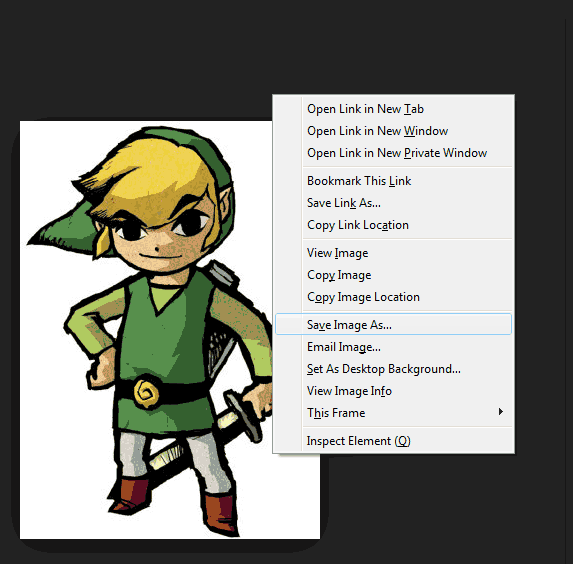
Step 3: Move your mouse directly over the picture and the "RIGHT CLICK"
Picture
Step 4: A "MENU" will appear, SELECT (Left Click) "Save Image As"
 (In Internet Explorer the option is "Save Picture As")
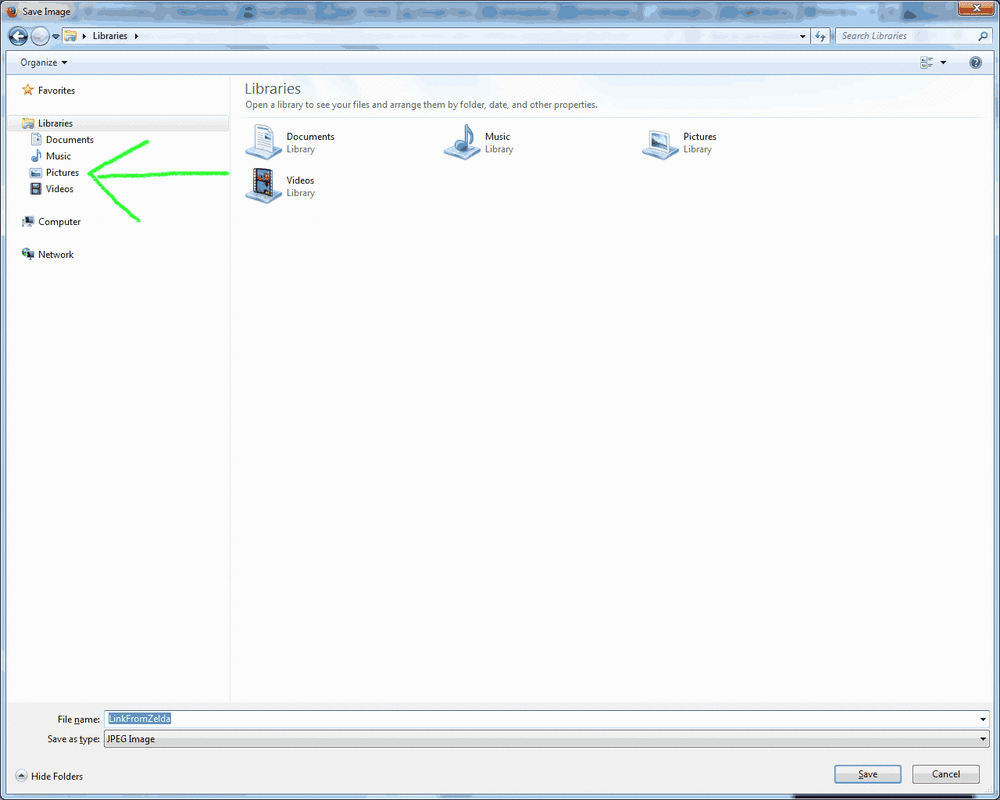
Picture
Step 5: SELECT the folder destination where you would like to save your image like the folder "PICTURES"
Picture
Step 6: Type a Name for your Picture File
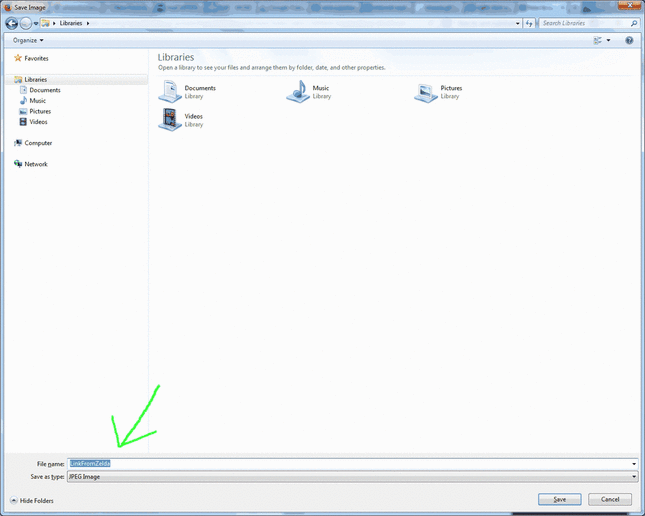
Picture
Step 7: Now finish saving your picture by SELECTING "Save"
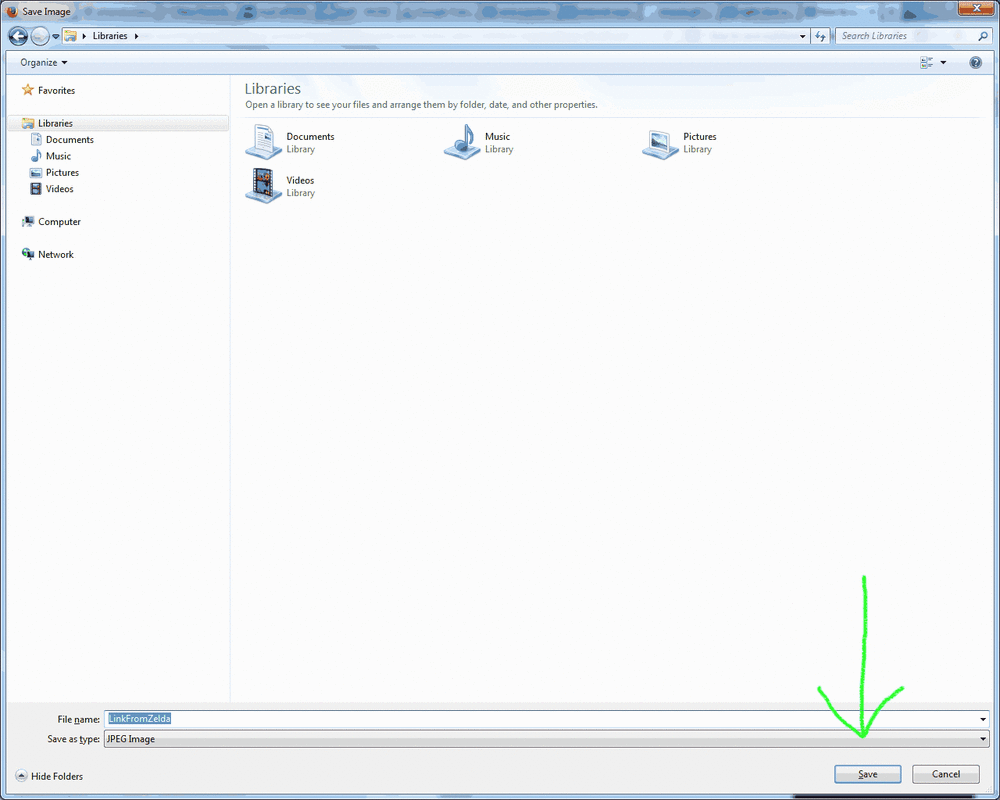
Picture
That's it! Your done! :)
70 Comments

    Questions &
    Answers Page


    Archives

    November 2013

    Categories

    All

    RSS Feed

    Quick Links
    • Tech Resource Page
    • Tech Tips & Tricks Page
16541 Rd. 168 Porterville CA. 93257 * Elementary Office - 686 9713 * District Office -  686 9712
Website Language
  • HOME
  • DISTRICT
    • Public Notice
  • About Us
    • Hours
    • School Map
    • Contact Us >
      • Superintendent
      • School Office
      • Business
      • Technology
      • Food Service
      • Heart
  • Departments
    • District Office
    • Elementary School Office
    • Business Department
    • Human Resources
    • M.O.T
    • Technology Department
    • Food Service
    • Curriculum-Instruction
  • School
    • Calendar
    • Bell Schedule
    • Parent & Student Handbook
    • Foggy Day Schedule
    • Bulletin
    • News Alerts
    • Gallery
    • SocialMedia
    • ClassOf2020
    • Store
    • TK-Information
    • ELAC & SSC
  • Staff
    • Aeries
    • Math & ELA Pacing Guide
    • Directory
    • IXL >
      • Curriculum alignments
    • Knowledge Base
  • Students
    • Cyber Safety
    • Digital Citizenship
    • Clever Dashboard
    • CAASPP Practice Test
    • AR/STAR
    • IXL
    • School Climate Report Card
  • Calendar
  • Parents
    • Parent-Student Handbook
    • Parent Involvement
    • Aeries Parent Portal
    • AR & STAR Parent Portal
    • Parent Tech Guide
  • Promotion Live Stream
  • Services
  • DLP
    • SCHEDULE-DLP
  • LIVE STREAM
  • Choices
  • WUSD-Info
  • Rance-Mulliniks-Invitational
  • DNA
  • Preschool